EU law, augmented.
Read any EU act or CJEU judgment with every defined term, cross-reference and citation one click away. For lawyers, compliance teams and students, on EUR-Lex and here on eureka.legal, in all 24 official languages.
Add an article if you like: “GDPR 17” opens it directly. For a judgment, type its case number, “C-311/18”, or its popular name, “Schrems II”.
Free during the launch period.
Try itAn example
An article and a judgment, as Eureka shows themArticle 45 of the GDPR, as Eureka shows it
Click a blue term, reference or citation: its definition, article or judgment opens beside the text.Every blue term and reference opens its definition or article beside the text.
Article 45
Transfers on the basis of an adequacy decision
1.A transfer of personal data to a third country or an international organisation may take place where the Commission has decided that the third country, a territory or one or more specified sectors within that third country, or the international organisation in question ensures an adequate level of protection. Such a transfer shall not require any specific authorisation.
2.When assessing the adequacy of the level of protection, the Commission shall, in particular, take account of the following elements:
On EUR-Lex
The extension adds the panel to the page you are reading.
Open an act on eur-lex.europa.eu in the HTML view: the terms and references become links, and the sidebar holds the cards, the contents, the case law and the timeline. Open a judgment, and its citations and the provisions it quotes become links too.
Get the EUR-Lex extensionThe extension runs in Chrome and Edge on a computer.
On eureka.legal
The reader, on any device.
Every act and judgment, with the same links as the extension, on your phone too, and every definition has its own page you can link to. Share an article with anyone: the link shows the article with its definitions and references, no account and no extension needed.
Open the readerWhat Eureka adds
Defined terms and references
Click a defined term to read its definition, or a reference such as "Article 6(1)(c)" or another act to read the provision it points to, without leaving the page. In all 24 languages.
Translations side by side
Switch to another language version at the same place, or read two or three language versions side by side, article by article. Where the versions differ, a translation notice says how (marked "AI").
Case law per article
Each article shows how many judgments interpret or cite it, as recorded by the Publications Office. The list names the paragraphs that cite the article and opens the judgment right there. A short AI summary says what each judgment holds about the article.
Timeline and what changed
The dates from which the act's provisions apply, and a word-by-word comparison of each changed article between consolidated versions, with the amending act named.
Follow acts and cases, get alerts
Follow an act or an article and be notified of new events for it, such as an amendment, a corrigendum or a judgment. Follow a case for the Advocate General's opinion and the judgment: in the extension and the reader, and by e-mail.
Judgments, linked
Judgments of the Court of Justice and the General Court, on EUR-Lex and in the reader: citations and the Court's own paragraphs are links, quoted provisions open in their act, and you can read two language versions side by side. Follow a pending case to hear about the opinion and the judgment.
Pricing
Eureka 1.0 is free during the launch period, with everything included. Sign in with your e-mail address; no password, no payment needed. Afterwards there will be two plans, Basic and Pro. Students with a university e-mail address get Pro free, and accounts from the launch period keep everything for at least three months after paid plans start, then get a founding-member price.
Frequently asked questions
Eureka does not change the EUR-Lex page I am reading
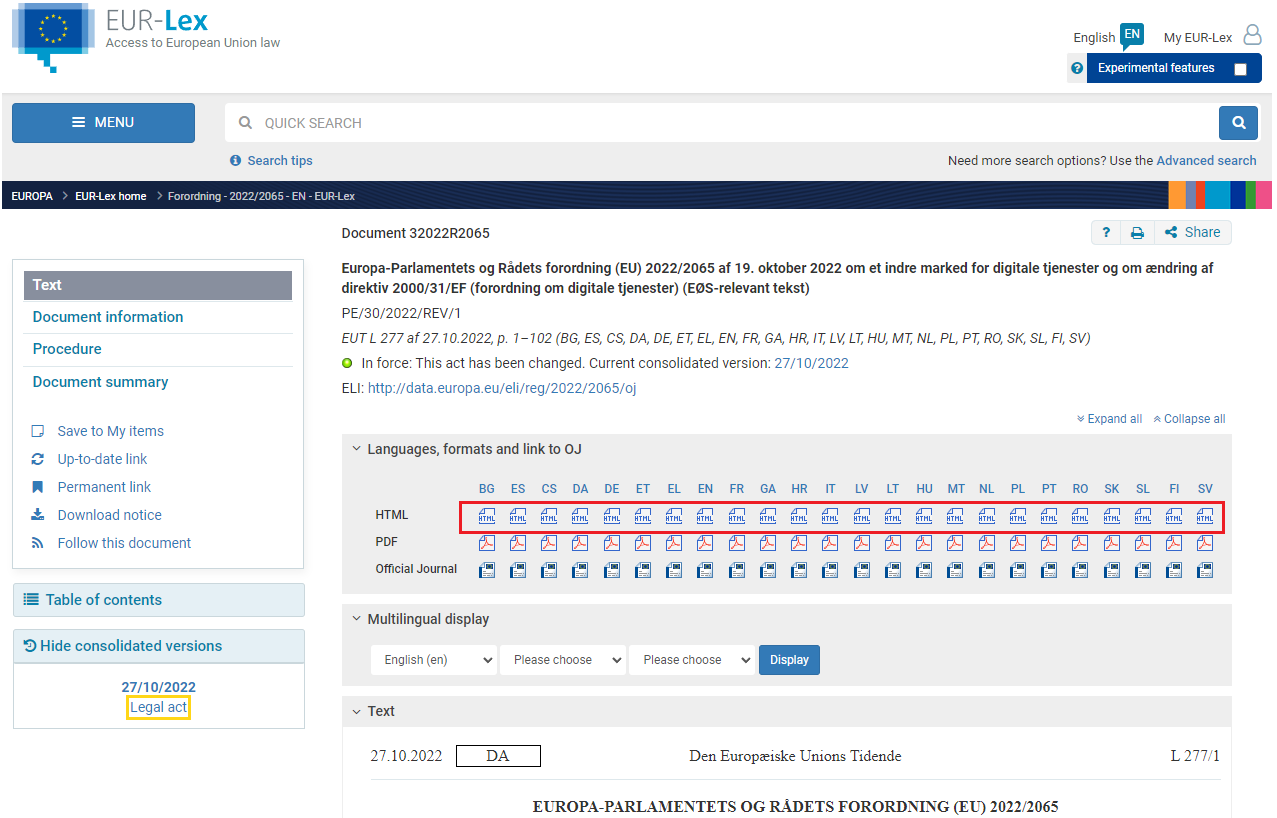
Eureka only works on the HTML view of an act or a judgment (the address contains /TXT/HTML/), not on the PDF or Official Journal views. Choose "HTML" among the formats offered on EUR-Lex. If it still does not work, please contact us with the page's address.
Which case law does Eureka cover?
The judgments, orders and Advocate General's opinions of the Court of Justice and the General Court, as published on EUR-Lex. National case law is not covered. The Publications Office links judgments to the articles they interpret some months after the judgment, so the newest case law can be missing from an article's list. Judgments from before about 2014 are read from the older format EUR-Lex has them in: their paragraphs, operative part, quoted acts and the judgments they cite are linked as for newer ones; the oldest, which have no paragraph numbers, show their text without paragraph links.
I cannot add Eureka from the Chrome Web Store
On a company computer, the IT department often has to allow the extension first. The page For IT departments gives them the extension id, the policy settings for Chrome and Edge, and what data the extension sends. Browsers other than Chrome and Edge are not supported.
Can I rely on the AI-generated content?
Not on its own. AI-generated evaluations are marked "AI"; they are aids to reading, not legal advice, and they can be wrong. Definitions, articles and judgments are shown as published on EUR-Lex. Only the Official Journal of the European Union is authentic; a judgment is authentic in the language of the case.
Do I need an account?
Yes, to open the features: definitions, references, case law, follows and sharing. Opening a document that Eureka has not read before also needs an account. The page itself, with its marks and structure, shows without one. Sign in with your e-mail address; there is no password. The same account works in the extension and in the reader.
Do I need the extension?
No. The reader on eureka.legal shows acts and judgments with the same links, on your phone too. The extension is for those who prefer to stay on EUR-Lex itself: it adds the same features to the page while you read there.
Can I share with people who do not use Eureka?
Yes. A shared article link shows that article with its definitions and references to anyone who opens it, without an account; everything else on the page asks them to sign in. A shared judgment opens whole: its citations, the provisions it quotes and the other language versions work without an account.
Contact
If you have questions, suggestions or anything else, please let us know below.
Eureka.legal, Denmarkreg. no. 46857151
eureka@eureka.legal